Building a Starcraft II coaching agent
In this article I walk through the agent architecture fundamentals behind a passion project I built.

This article goes through the fundamental components of an agent. We’ll be building a coaching agent for the realtime strategy game Starcraft 2. This agent is an expert at the game and helps players improve.
Motivation
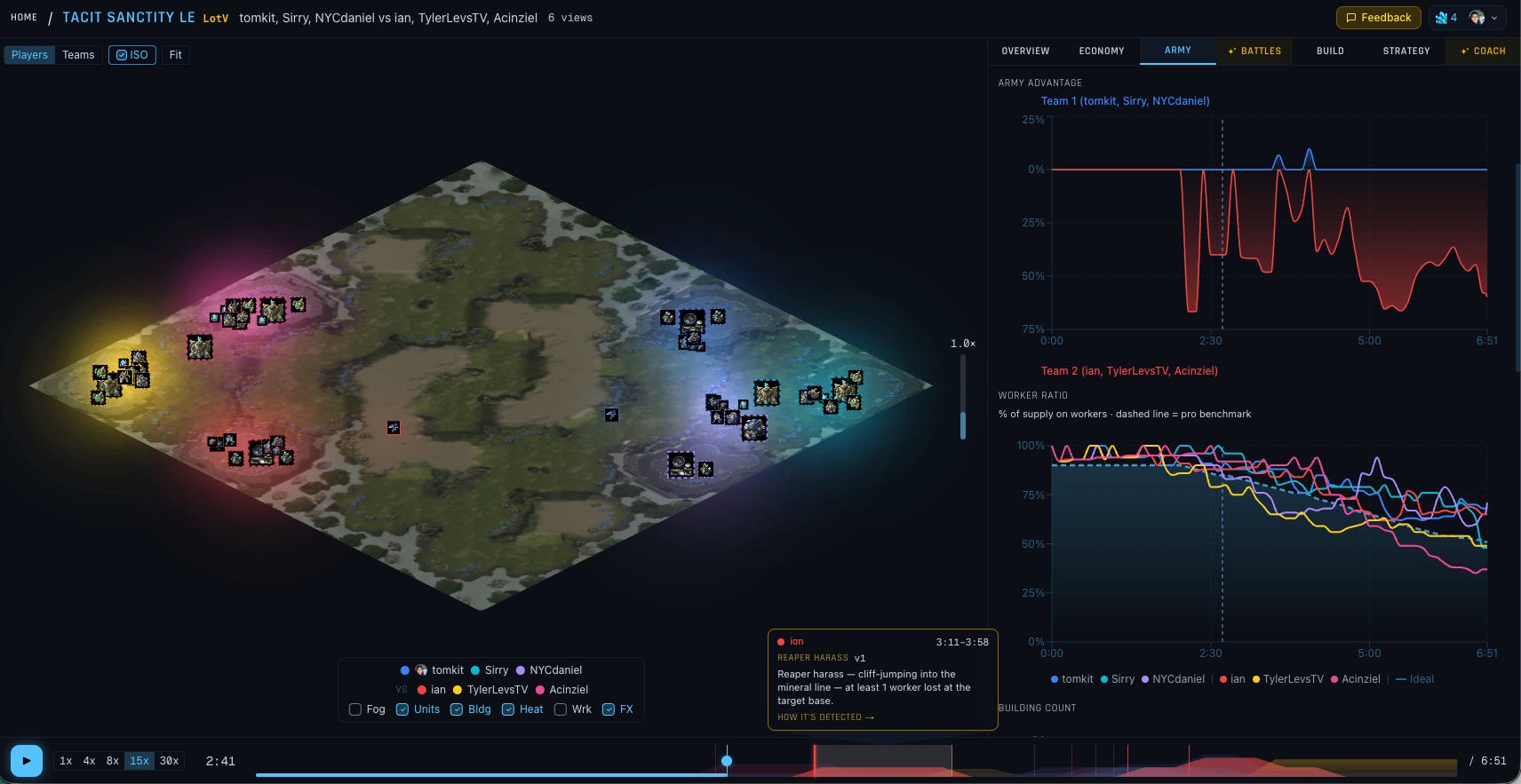
Earlier this year a group of friends and I picked Starcraft 2 back up. It’s been 15 years since I last played. The game still has an active community of ~200K players, which surprised me. The tooling hasn’t evolved much though: SC2Replay, Liquipedia.net, Spawningtool.com, PHP, ad banners, and WordPress. This was a perfect opportunity to vibe a passion project, help the community, and experiment with agent design.
Everything starts with data
Data is what makes agents work, from pre-training all the way through agent engineering. Our Starcraft 2 agent is no different. It will need two kinds of data:
Domain knowledge
Personal game replays
Starcraft 2 has the nice property that it’s mature and publicly available — the community and professional gamers have captured a lot of institutional knowledge across wikis, professional casts (videos), and replay data (time-series files). That makes for a great self-contained project.
Data: Domain knowledge
We’ll be using Liquipedia.net, a wiki for all-things-Starcraft 2, as the foundation for the domain data. The important game concepts include: race, units, buildings, technology tree, abilities, maps, build order strategies, and patch notes. The objective of the game is to win battles, using the right unit composition and strategies, to destroy the other team.
The wiki captures all of this, including professional strategies that developed over time.
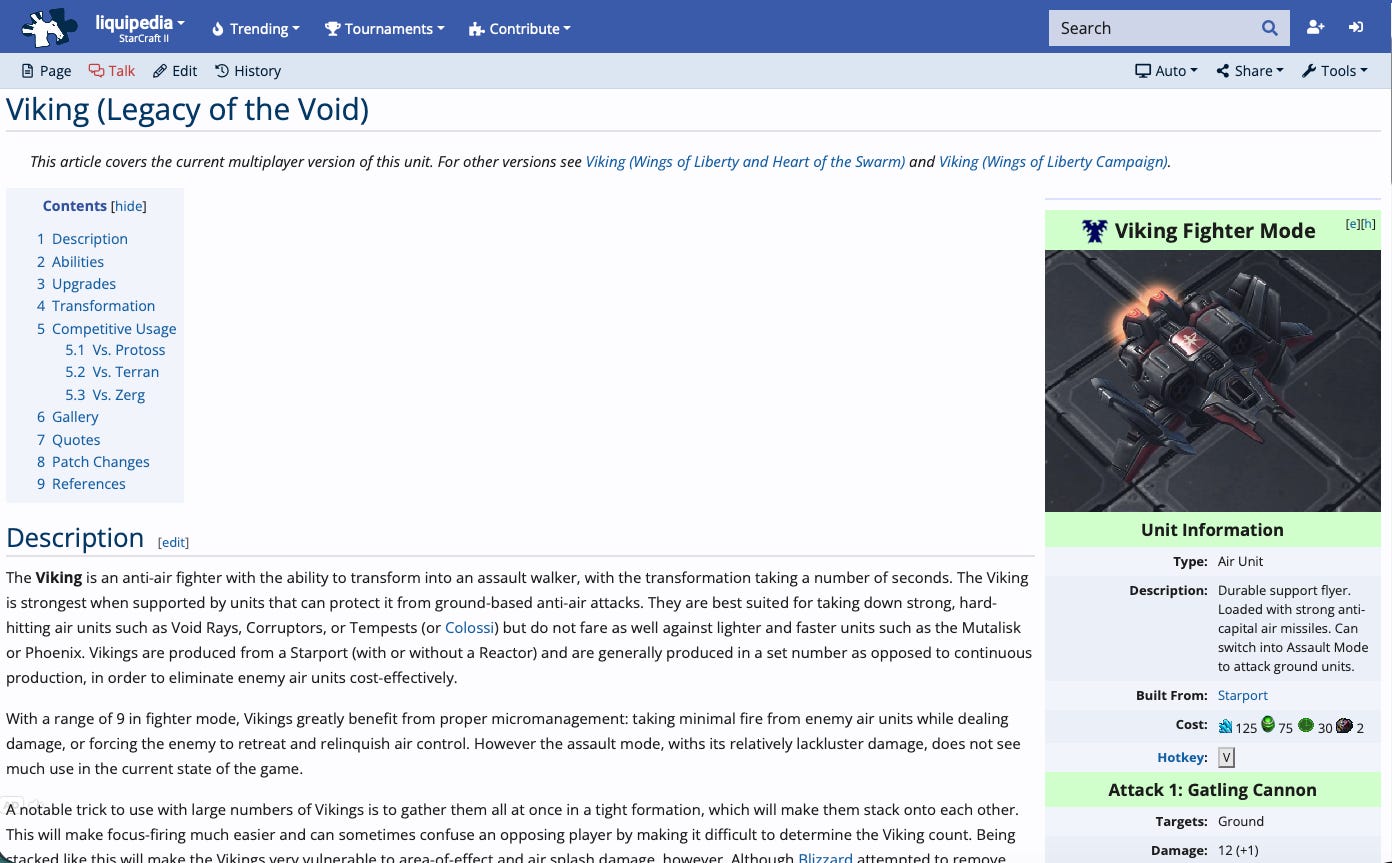
All of the wiki data fits into 16MB on disk. Roughly 4m tokens. The largest LLM context window size in May 2026 is 1m, so we can’t just stuff it in. The other problem with putting everything in the context window is context rot [1, 2, 3].
Instead we’ll use RAG: split the corpus into chunks, embed each one, and at query time look up the chunks nearest the embedded question using cosine distance. We’ll also add two more Information Retrieval techniques: 1) run free-text search (a.k.a keyword search or BM25) alongside semantic search, and once both indexes return their top candidates, 2) run a reranker that reads each candidate text against the actual query and re-sorts them.
We’ll use the Vercel stack (NextJS, Supabase) for simplicity. Here’s our pipeline:
Crawl Liquipedia and chunk by heading tree.
Embed each chunk with text-embedding-3-small (OpenAI’s cheap general-purpose embedding model with 1536 dimensions) into pgvector for semantic search.
Use Postgres’s built-in full-text search alongside (tsvector / tsquery).
At query time we combine the two rankings via reciprocal rank fusion, keeping the top 150 candidates, and rerank those 150 with Cohere’s rerank-english-v3.0 before returning the top K to the LLM.
We’ll add one last thing. Anthropic published an article called Contextual Retrieval that adds one more concept on top of all of this: before embedding each chunk, let an LLM write a short “what this chunk is about within the document” prefix and prepend it. They report this cuts retrieval failures by ~35% on their test corpora. Using their cookbook makes it easy to apply.
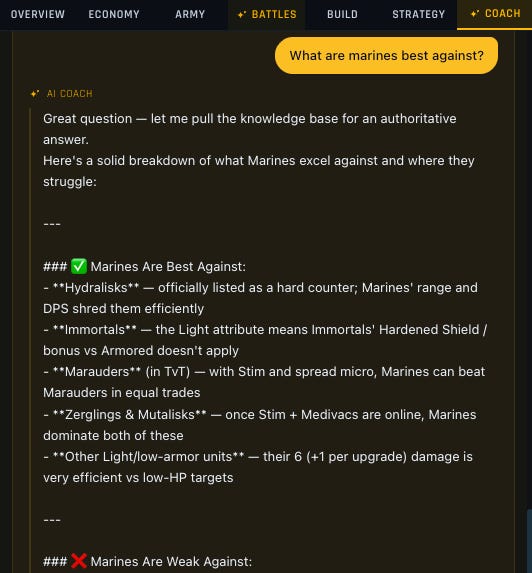
Was it worth the work? I evaluated the pipeline against a 270-question set (~3 questions per Liquipedia page, with Opus 4.7 and GPT-5.5 cross-verifying each question against the source wikitext). The metric we looked at is pass@K, i.e. did the chunk containing the right answer show up in the top-K retrieved results? Plain semantic retrieval (the baseline) hit pass@10 = 86.7% and pass@20 = 90.7%. The full pipeline above hits 96.3% / 98.1%.
We also ran a second end-to-end eval pass: generate an answer from the retrieved chunks, then judge it against the gold dataset with both Claude Opus 4.7 and GPT-5.5. End-to-end answer correctness climbed from 68–78% on the baseline to 80–87% while faithfulness stayed near 90%.
An alternative to RAG
Filesystems-as-context picked up steam in late 2025 as an alternative. Instead of chunk and embedding your data, you lay it out on the filesystem. Folders encode hierarchy, filenames and content carry keywords, and the agent navigates with shell tools (ls, find, cat, grep, others) plus throwaway scripts it writes when shell isn’t enough. This beats RAG when:
Content is heterogeneous. Code, configs, logs, images, binaries all live in the same place.
Reads need to be lossless. Chunk splits paragraphs mid-claim and discards the surround context. cat file.md doesn’t.
Lookups should be iterative. The agent decides what to read next based on what it just found, instead of getting a single top-K bag up front and being stuck with it
It’s not free. There are cases where RAG is still better, when user queries have no overlapping keywords withe the source, so some products will use both RAG and the filesystem to complement one another.
You also incur a cost of standing this infrastructure up.
To sidestep this, some companies provide a more limited virtual filesystem and shell interface for agents: you simplify your infra and reap most of the benefits of the filesystem approach, but you don’t get the full-blown shell that runs additional commands and supports code execution.
We didn’t use the filesystem approach in this project, but we can explore integrated ones like Vercel Sandboxes in the future.
Data: Personal game replays
The second class of data for our agent is personal game replays. These are binary-encoded files (.sc2replay). Each file holds game metadata (players, map, etc.) and event streams (time series of player actions, unit and structure born/death times, etc.).
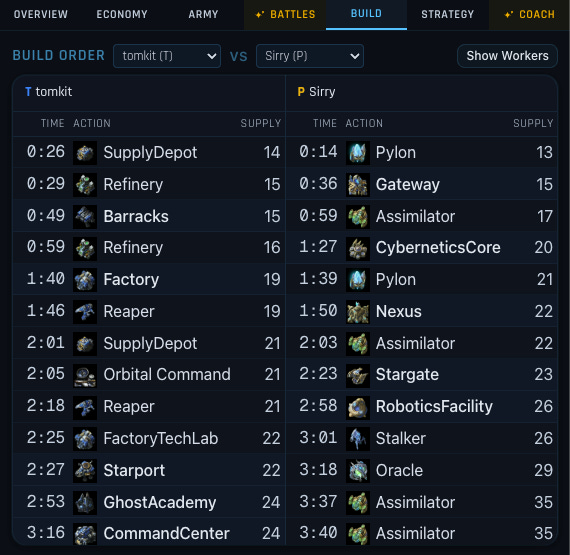
Here’s an example of an event stream for “build order”, i.e. what timestamp did players construct buildings:
  [
    { "frame":    13, "time": "0:00", "name": "SCV",             "supply": 12, "isWorker": true  },
    { "frame":   284, "time": "0:12", "name": "SCV",             "supply": 13, "isWorker": true  },
    { "frame":   529, "time": "0:23", "name": "SupplyDepot",     "supply": 14, "isWorker": false },
    { "frame":   555, "time": "0:24", "name": "SCV",             "supply": 14, "isWorker": true  },
    { "frame":   702, "time": "0:31", "name": "Refinery",        "supply": 15, "isWorker": false },
    { "frame":   936, "time": "0:41", "name": "Refinery",        "supply": 15, "isWorker": false },
    { "frame":  1103, "time": "0:49", "name": "Barracks",        "supply": 15, "isWorker": false }
  ]
We can take this data and render it in a friendly way:
For the knowledge base, we stored text documents in a RAG. Time series data isn’t a good fit for RAG since there aren’t semantics to embed, and embedding the high-resolution time series would compress it into a much smaller dimensional space, losing data in the process. A time series database is a good fit, but for this project we’re working with 1–5 replay files (~KBs) at a time, so we’ll just hold them in memory.
Querying for build order is straightforward. What about more complex metrics?
“Idle Production” is an example of a metric derived from multiple inputs. It looks at:
The idle time of buildings capable of producing army units
The available resources
The available supply capacity
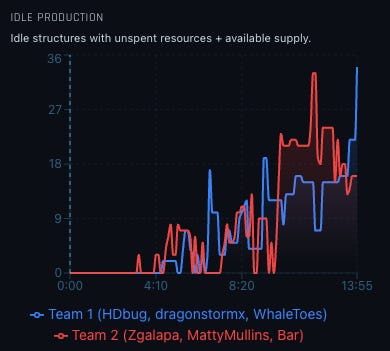
Calculating this metric in code took many iterations to get right. If a player asked for it in chat, the coach would almost certainly compute it wrong. The farther a request gets from source-of-truth, the more room LLM errors have to compound.
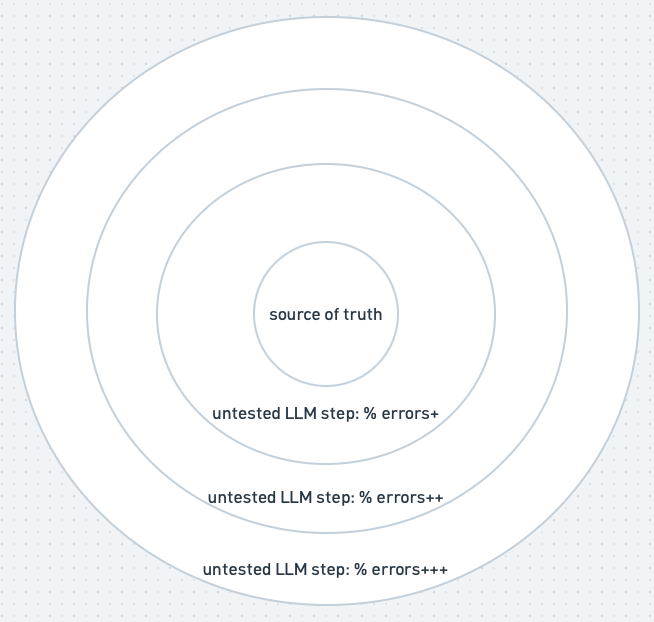
You can reduce the error rate by introducing determinism. For data analytics, that means pre-calculating metrics, then exposing an API for the agent to use.
Pre-calculating metrics introduces rigidity and constrains the agent experience. To counteract that, we can use a semantic layer to provide both determinism and flexibility for agents. It achieves both by canonizing metric calculation for determinism, but also exposes lineage and relationship between metrics in a structured way as agent context — this gives it flexibility to derive new complex metrics.
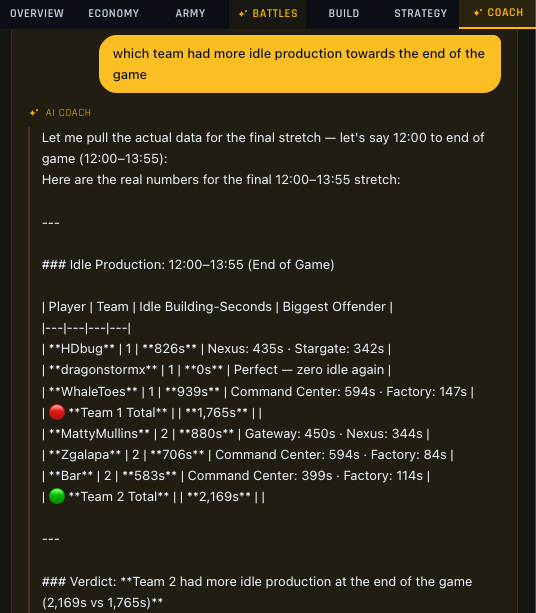
We don’t need a full semantic layer, but we’ll take the concepts and implement them in our API, get_metric(name, time window). The agent can now accurately fetch Idle Production:
The coach’s agent loop
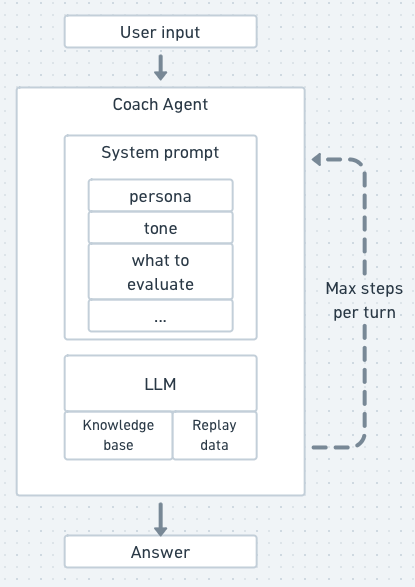
With the knowledge base and replay data wired up, the last piece is the agent itself. The LLM does the thinking and reasoning, and the tools we’ve added above let it reach for things outside its context window and act on them.
The system prompt sets the coach’s expertise and voice — who the agent is (an elite SC2 coach with Grandmaster-level knowledge), what to evaluate per player (build order, macro, composition, timing, scouting, decisions), how to phrase critique, and what tools it has available.
The loop itself is basic: user asks a question, LLM either answers from context or calls a tool, the tool result feeds back, LLM either calls another tool or answers. We cap it at 6 steps per turn. We use Opus 4.7, for its reasoning capabilities, to come up with the initial professional analysis and Sonnet 4.6 for chat (cheap, fast, good at tool routing).
Self-improvement using multiple agents
The coaching agent’s foundation is in place. The last step is to collect feedback on how it’s performing so we can improve it — or rather, so another agent, the coach-improvement agent, can.
To do this, we’ll add thumbs up/down buttons next to each player-feedback line:
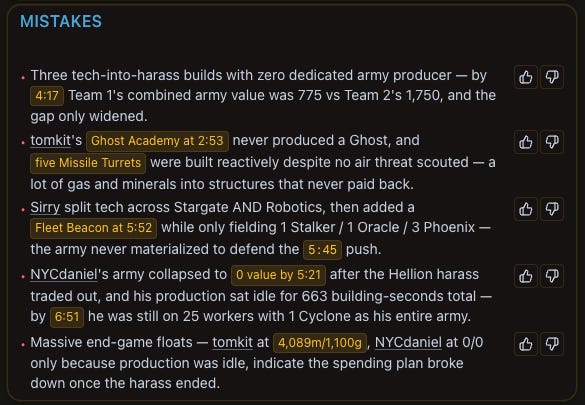
The coach-improvement agent will need access to the filesystem, since we need it to make code changes, test, and push commits. We could use a managed agent offering, build one ourselves using harness SDKs (e.g. Codex SDK or Claude Agent SDK), but for simplicity, we’ll just run it locally via OpenClaw/Hermes.
Our two loops — the coach and the coach-improvement agent — connect through users’ feedback on our coaching advice (orange below):
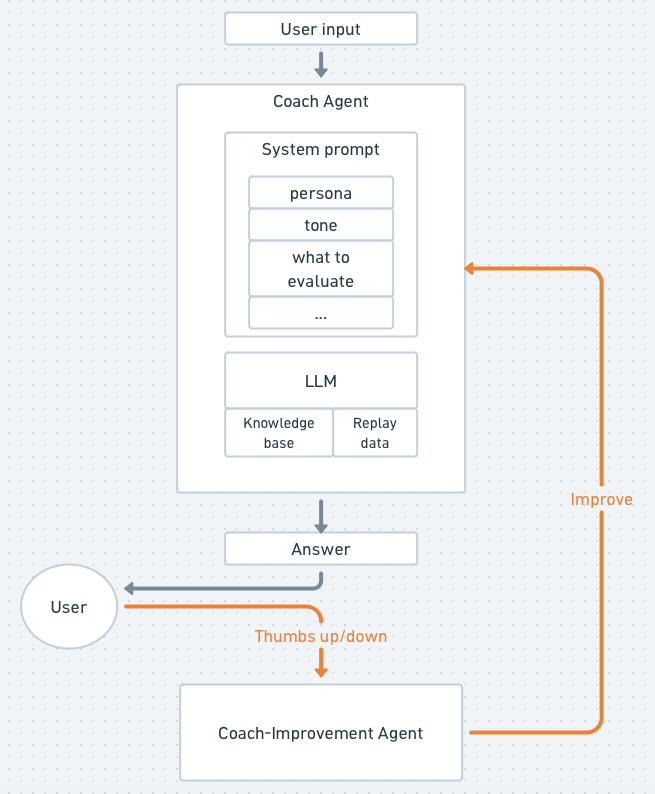
On a thumbs-down, we write the feedback row to our Supabase Postgres and fire a signed webhook to our OpenClaw/Hermes gateway. The gateway triggers the coach-improvement agent to investigate and make improvements.
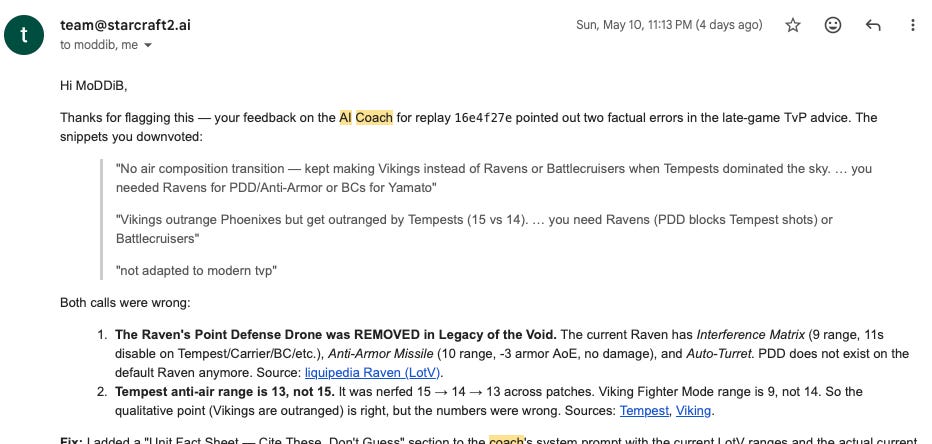
This is a low-stakes passion project, so instead of putting a human in the loop to review and block on proposed improvements, we have the agent push directly and email us what it changed. If anything looks off, we ask it to revert or make further changes.
Try it out
Give the coaching agent a whirl at: https://www.starcraft2.ai.
The ecosystem keeps evolving — memory, multi-agent coordination, and more — so there’s a lot to improve. Leave a comment if you think we could have done something differently or want to see further improvements!